


How-to · Hoopla
Salesforce users unable to login to Hoopla
Fix the account-not-connected error on Login with Salesforce by making sure the user meets your Salesforce user report criteria.
Reasons why users may not be able to login to Hoopla
Section titled “Reasons why users may not be able to login to Hoopla”If your users receive this message, “Your account has not yet been connected to Salesforce. Please contact your admin to set up the connection”.
It means that they are trying to log in using the Login with Salesforce option, but they are not included in the master Salesforce user report that syncs to Hoopla.
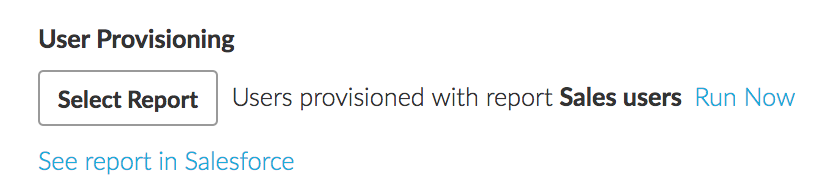
Check out the criteria you have set for your Salesforce user report by going to the Salesforce Integrations area and scroll down to the User Provisioning area. Then click on “See report in Salesforce”:
Related articles
Section titled “Related articles”- Create a Salesforce user provisioning report for Hoopla Build a Tabular Salesforce user report and connect it to Hoopla so your Salesforce users are provisioned and kept in sync automatically.
- Verify a Hoopla player’s Salesforce login Verify a player’s Salesforce user account so they can sign in to Hoopla with the Login with Salesforce option.
Still having trouble?
Email our support team.