


How-to · Hoopla
Set up automatic logout for inactive Hoopla users
Sign out inactive web app users automatically after a timeout you choose, adding a layer of security to your account.
When to use this
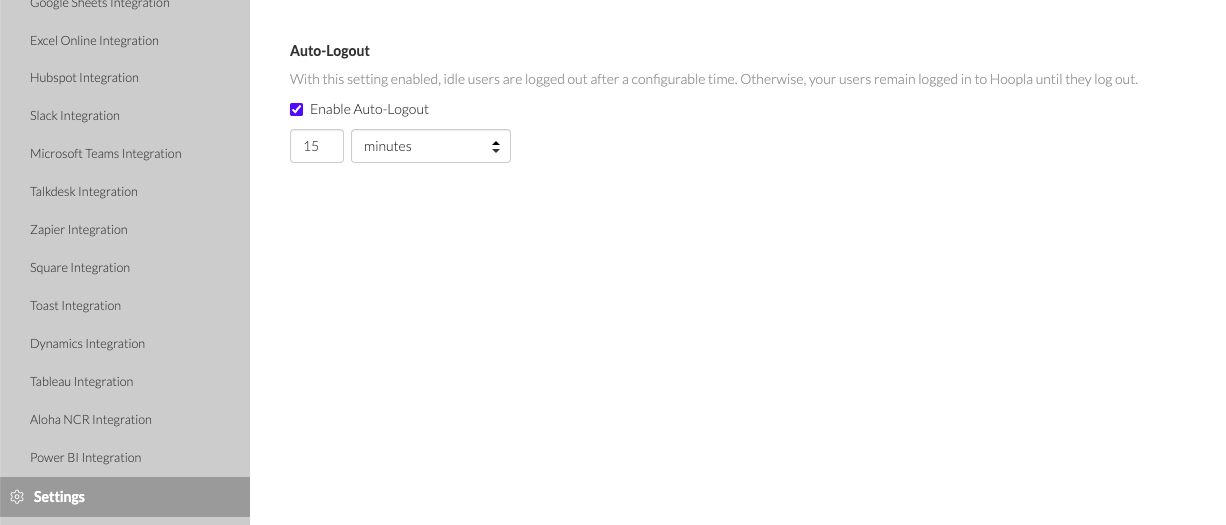
Section titled “When to use this”Auto-Logout adds an extra layer of security to your Hoopla account. Enable this feature to automatically log out users from the Web app after a period of inactivity. You can configure the timeout duration to any length—from minutes to days or months—by simply checking the box.
- Sign in to Hoopla as an account administrator.
- Open Settings in the left navigation.
- Find the Auto-Logout section shown below.
- Select Enable Auto-Logout.
- Enter the timeout value and select its time unit, such as minutes.
- Save the change using the settings page’s save control, if one is shown. Reopen Settings to confirm that the enabled setting and timeout were retained.
Verify
Section titled “Verify”Leave a web app session inactive for the configured timeout and confirm that it is signed out. Check the saved timeout in Settings if the result differs from what you selected.
If it doesn’t work
Section titled “If it doesn’t work”Confirm that you are an account administrator and that the setting and timeout were retained. Contact support if the setting is unavailable, cannot be saved, or causes unexpected sign-outs. Ask your account administrator to review the policy if it disrupts your work.
Related articles
Section titled “Related articles”- How 2-Step Verification protects your Hoopla account Understand how 2-Step Verification adds an SMS security code to your login, how Enterprise admins can enforce it, and where it’s available.
- Track user login history in Hoopla See who has logged in to Hoopla and when, using Hoopla login history or Salesforce, depending on how users were added.
- Manage your account settings in Hoopla Update your name, email and password, and turn on two-step verification, offline device alerts and remote assistance from your Account page.
Still having trouble?
Email our support team.