


How-to · Hoopla
Add generic metrics from Google Sheets
Set up a Generic Identifier tab in Google Sheets and map it to Hoopla metrics that aren't tied to users or teams, such as website traffic.
When to use this
Section titled “When to use this”Many business metrics cannot be attributed to an individual user or even a team. For example, you may want to show the company’s stock price, website traffic, or month-over-month growth. To display those types of values in Hoopla, you should leverage Generic Metrics.
Each Generic Metric value has a Generic Identifier, which takes the place of what is traditionally a User or Team.
Example: You have a Metric called Website Traffic. Within that Metric, you may have three values represented by three different Generic Identifiers: Home Page, Product Page, and Pricing Page.
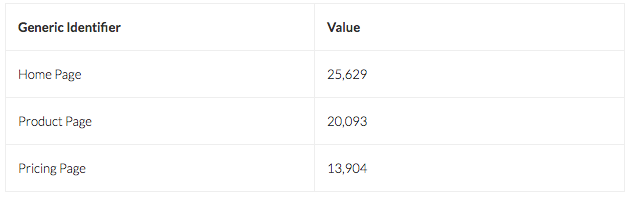
Adding a Generic Identifier Value via Google Sheets
Section titled “Adding a Generic Identifier Value via Google Sheets”- Within a Google spreadsheet, create a new sheet tab.
Name it something that you’ll be able to recognize later.
-
Add a column with the label Generic Identifier.
-
Within that column, enter one or more names that will carry metric values. (See examples above.) You can use Generic IDs that you’ve used before, or define a new one.
-
Assign a value to each Generic Identifier.
(These values could be calculated from other metrics, or even come from other systems.)
- In the Hoopla Configure menu, go to Integrations/Google Sheets and add or edit a spreadsheet mapping configuration. In the Google to Hoopla section, select your Generic Identifier sheet tab and map the appropriate columns to their corresponding Hoopla Metrics. Save.
Verify
Section titled “Verify”Check that each intended Generic Identifier has a value and that its spreadsheet column is mapped to the intended Hoopla metric.
If it doesn’t work
Section titled “If it doesn’t work”Review the Generic Identifier column, its values, and the selected sheet tab. Follow the linked Google-to-Hoopla mapping guide or contact support if the values are not appearing as expected.
Related articles
Section titled “Related articles”- Connect Hoopla to Google Sheets Connect Hoopla to your Google account so you can export metric data to Google Sheets and import calculated data back into Hoopla.
- Map data from Google Sheets to Hoopla metrics Automatically update Hoopla player or team metrics from Google Sheets by mapping sheet columns to metrics on a sync schedule.
- What are metrics in Hoopla? Understand how metrics track your KPIs, the user, team and generic values they store, and how they power leaderboards and newsflashes.
Still having trouble?
Email our support team.